Your Mac is running things you never installed. Most tools hand you a
list of file paths and leave you to work out which ones matter.
Shadow Sentinel finds them, then tells you exactly what each one is.
Notarized by Apple
Apple Silicon & Intel
Cancel any time
The difference
Every scanner shows you a list. Then what?
Signature matching catches known malware and shrugs at everything else.
What's left is a wall of technical entries, and the only honest answer
most tools can give you is "unknown". That's where Shadow Sentinel starts.
What other tools tell you
com.updater.helper.plist ~/Library/LaunchAgents/ Status: unsigned · runs at login
Technically accurate and completely unhelpful. Is that a printer driver
you installed two years ago, or is it reading your keystrokes? Delete
the wrong one and you break something you needed.
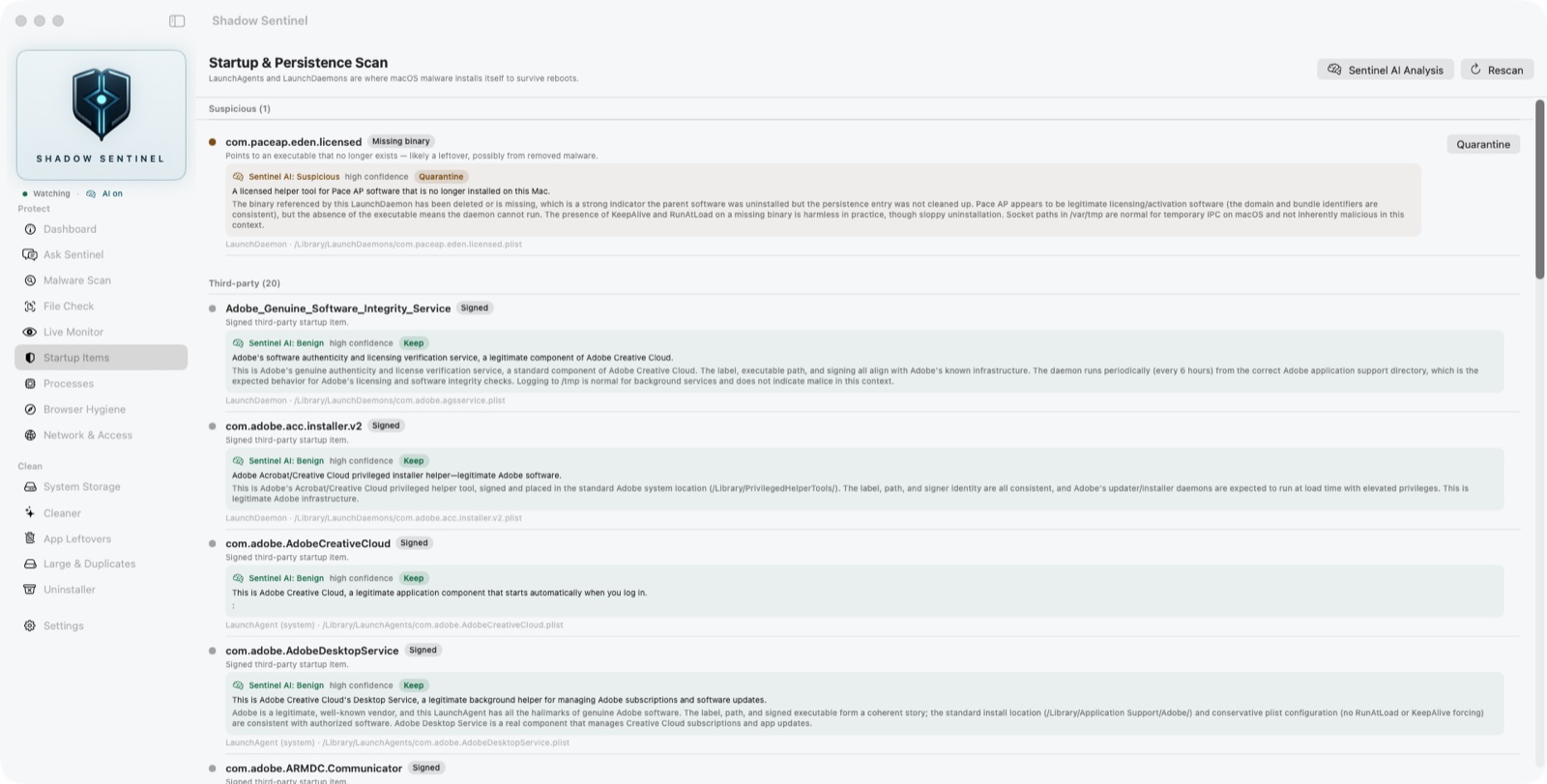
What Shadow Sentinel tells you
com.updater.helper.plist ~/Library/LaunchAgents/ Status: unsigned · runs at login
Malicious · high confidence
Runs a script that downloads and executes remote code at every login.
Legitimate software never does this. Recommended: quarantine.
Protect
Find it, understand it, deal with it
Signature matching and code-signature verification handle what rules can
decide. The analyst handles everything in between — which, on a real Mac,
is most of it.
Full-system malware scan
Walks 57 locations where Mac malware actually lives, inspecting real
executables rather than trusting file extensions.
Startup & persistence
Every LaunchAgent and LaunchDaemon — where malware hides to survive
a reboot — checked against known families.
Live monitor
Watches those folders in real time. The moment something installs
itself at startup, you know — and you know what it is.
Ask Sentinel
Ask about anything on your Mac in plain language. It answers using
what it actually found on your machine, not generic advice.
Process inspector
Flags running processes with malware tells: executing from temp
folders, hidden directories, unsigned binaries in odd places.
Browser hygiene
Audits extensions across Chrome, Brave, Edge, Arc, Firefox and Safari,
and catches hijacked homepage and search settings.
Network & access
What on this Mac can be reached from outside — open ports, sharing
services, administrators — and which apps have been granted screen
recording or keystroke access.
File check
Drag one file in — a download, an installer, something you were
sent — and get the same checks a full scan runs, before you open it.
The one nobody answers
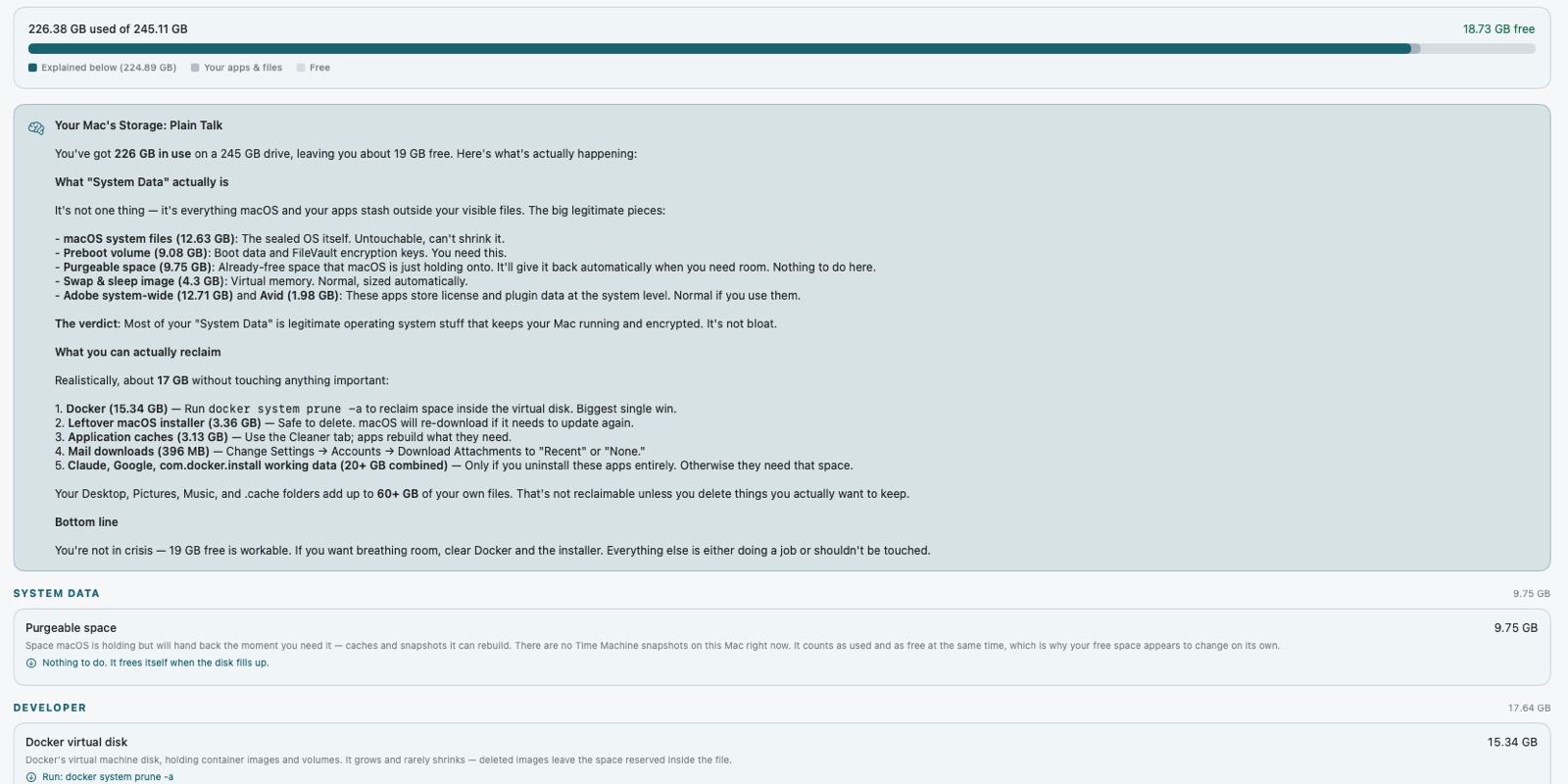
What is actually inside “System Data”?
Every Mac owner has opened Storage settings, found 150 GB labelled
System Data, and been told nothing else. Apple won't break it down.
Neither will any cleaner we've found.
Shadow Sentinel does. It identifies each thing inside it by name, tells
you what created it, whether it's safe to remove, and what breaks if you
do. Most of it turns out to be Time Machine snapshots, a sleep image the
size of your RAM, and developer caches nobody knew were there.
The breakdown is free, no account or card. Reclaiming the space it finds is part of the subscription.
Clean
Reclaim the space, without the guesswork
Everything Shadow Sentinel removes goes to the Trash. Nothing is ever
permanently deleted, so a mistake is always one click from undone.
Cache & log cleaner
What each app has quietly accumulated, sized and sorted, so you
decide what goes rather than trusting a progress bar.
App leftovers
Support files, preferences and caches belonging to apps you deleted
months ago and macOS never cleaned up.
Large & duplicate files
Anything over 100 MB, plus hash-verified duplicates — identical
content, not just identical names.
Complete uninstaller
Drag in any app and it finds everything that app owns across two dozen
system locations, then removes all of it at once.
Leftover macOS installers
macOS routinely leaves multi-gigabyte update installers behind after
it updates, and nothing removes them. Sitting at the root of your
disk, invisible in Finder.
Files you can't normally touch
Helper tools and system files that other cleaners fail on silently.
Removed with your approval — and still to the Trash, so a password
never makes something unrecoverable.
Built to be trusted
A security app should hold itself to a higher standard
Nothing is ever deleted
Every removal goes to the Trash. If Shadow Sentinel gets something
wrong, you restore it in one click.
Your files stay yours
AI analysis sends metadata only — names, paths, signature status.
Never the contents of your files.
Notarized by Apple
Signed with a Developer ID and verified by Apple, so macOS opens it
without warnings.
It complements macOS
Works alongside XProtect and Gatekeeper. It never disables or
replaces your Mac's built-in protection.
Find out what's on your Mac
Every scan and the System Data breakdown are free, no account needed.
Sentinel AI and cleanup are $9.99 a month after a seven-day trial you can
cancel any time.